
Online Pay Stub Generator for U.S. Employees & Businesses
Prepare professional and correct pay stubs within a few minutes online. Stubcheck assists American workers, freelancers, contractors, and small businesses to create legally format pay stubs with accurate tax computation and immediate delivery in the form of PDF.
You may need income documentation to rent an apartment or take a loan or need to prove income to secure employment or you may be the payroll manager of one of the teams, our online pay stub generator is designed to be fast, accurate, and compliant
What Is an Online Pay Stub?
Online pay stub is a form of a paycheck statement that is electronic. It clearly explains the calculation of the earnings and the deductions that include the federal tax, state tax, social security and Medicare.
The average U.S. pay stub will contain:
- Employee & employer details
- Pay period and payment date
- Gross earnings
- Withholdings and deductions in the form of taxes.
- Net (take-home) pay
When properly created, online pay stubs are extensively accepted by banks, landlords and lenders as well as government agencies.
Why Use Stubcheck’s Online Pay Stub Generator?
Stubcheck is only tailored to the U.S. payroll regulations and taxation structure, which makes it a secure option to use in documentation of incomes.
Correct U.S. Tax Calculations.
We automatically calculate:
- Federal income tax
- State income tax
- Social Security and the Medicare (FICA).
- Other standard deductions
This makes sure that your pay stub is based on real payroll figures.
Immediate PDF PayStubs Download.
No waiting. Create your pay stub and download a printable PDF immediately- it is ideal in applications, records or sharing.
Accepted as Proof of Income.
We normally use our pay stubs:
- Apartment rentals
- Loan and credit card applications.
- Employment verification
- Personal financial records
Constructed e4 Employees, Contractors and Small Businesses.
Stubcheck works with you, whether you are hourly paid, on a salary, or are self-employed .
Who Can Use Online Pay Stubs?
Stubcheck’s online pay stub generator is ideal for:
- U.S. employees
- Independent contractors (1099)
- Freelancers & gig workers
- Small business owners
- HR & payroll managers
If you earn income in the U.S. and need a clear, professional pay record, this tool is for you.
How to Create an Online Pay Stub (Step-by-Step)
Step 1 – Enter Employer & Employee Details
Add basic information such as name, address, and pay frequency.
Step 2 – Add Earnings Information
Enter hourly rate or salary, hours worked, and pay period dates.
Step 3 – Review Automatic Tax Deductions
Our system applies correct U.S. payroll deductions automatically.
Step 4 – Download Your Pay Stub PDF
Instantly download and use your pay stub—no delays.
Is It Legal to Use an Online Pay Stub in the U.S.?
Yes. Online pay stubs are legal as long as the information is accurate and truthful. Stubcheck generates pay stubs that follow standard U.S. payroll formatting and calculations.
Why Thousands Trust Stubcheck
- IRS-style payroll formatting
- Secure & private data handling
- Transparent calculations
- Fast turnaround
- Affordable pricing
Stubcheck removes the confusion from payroll documentation—no spreadsheets, no manual math, no stress.
Frequently Asked Questions (FAQ)
Are online pay stubs accepted by banks and landlords?
Yes. Professionally generated pay stubs with accurate tax details are commonly accepted across the U.S.
Can I create pay stubs for previous pay periods?
Yes. You can generate pay stubs for current or past pay periods as needed.
Is Stubcheck suitable for self-employed individuals?
Absolutely. Freelancers and independent contractors can create clean income records easily.
How fast can I get my pay stub?
Immediately. Your PDF is available right after completion.
Is my information secure?
Yes. Stubcheck uses secure systems to protect your data and does not share personal information.
Generate Your Online Pay Stub Today
Start now and get your pay stub instantly.
Build Your Stub Right Now
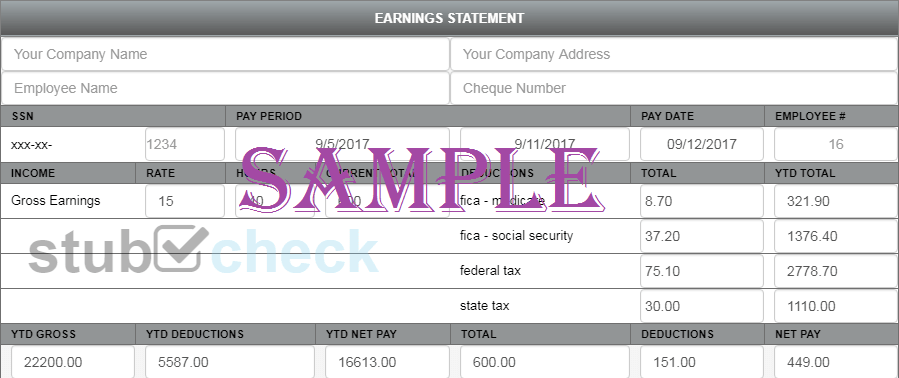
This is a sample paystub. The watermark will be removed once you’ve made the payment.