The Official Guide: How to Get Your Walmart Pay Stubs (for Current and Former Employees)
For both present and past workers, Walmart pay stubs can be as difficult to locate as a maze. Whether you’re a current or previous employee, Walmart, one of the biggest employers in the world, incorporates a number of intricate systems, such as OneWalmart and the official Walmart pay stub system. Whether you are preparing for tax season, need evidence of income for a loan, or just want to analyze your earnings, having the right information is essential when collecting Walmart pay stubs.
Our goal is to give you a thorough guide that you may use to get your pay history and current information. For your reference, Stubcheck.com is linked to Real Check Stubs in terms of integrity, so you can be confident that you will find reliable tools and resources the next time you need to generate or verify genuine financial papers.

Easy Access for Current Walmart Employees
If you presently work for Walmart, using the company’s internal digital systems is the fastest and most practical way to access and download your Walmart pay stubs. A WIN (Walmart Identification Number) and a password are needed for these systems.
Method 1: The Wire, which is the OneWalmart Portal
The OneWalmart portal, previously known as WalmartOne or “The Wire,” is where all employee details, including payroll, is stored. Accessing your Walmart pay stubs through this system is the most seamless method from any device.
1. Go to the Portal: Access the OneWalmart site.
2. Log in safely: Enter your WIN (Walmart Identification Number) and password. If you are logging in through a personal device not linked to the store’s network, you will likely need to complete two-step verification.
3. Go to Payroll: Once logged in to the OneWalmart portal, your employee dashboard will display a menu. From the menu, select the “Me” section.
4. To view your pay stubs, select Money or Paystub.
5. See and Download: Pick the pay period you want. You can view details about your recent Walmart pay stubs and print or download them as PDFs for your records.
Method 2: The Walmart App
As associates wishing to remotely access their information may find the Me@Walmart App is the most convenient mobile solution, as they can easily access their schedules and pay stubs.
1. Download the App and Sign In: Download the Me@Walmart App from your phone’s app store and sign in with your regular Walmart account.
2. Find the Pay Section: Use the app’s interface to find the pay or pay stub option.
3. Quick View: The app allows you to quickly view your most recent pay stubs from Walmart and in some instances allows you to view your payment history from previous dates.
For People Who Used to Work at Walmart (Access After Employment)
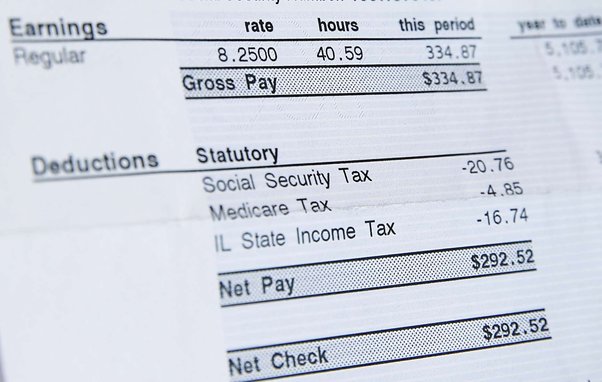
Accessing your records post employment can be a hassle, especially with Walmart. After you leave, your usual OneWalmart login and access to the Me@Walmart App will be curtailed or completely disabled. Former employees have access to a distinct pay stub portal, which is a plus.
Using the Official Walmart Pay Stub Portal (Money Network) This portal is specifically for accessing old pay records and W-2 forms after employment. Money Network collaborates with Walmart to facilitate this.
1. Go to the Pay Stub Portal: Visit the specific portal designed for Walmart pay stub access, which may require searching for the appropriate Money Network URL to access the site designed for Walmart.
2. First-Time Users Registering: For first-time users of the post-employment portal, please click on “Register Now.” Some identifying information is needed.
o Your birthday (MM/DD/YY)
o Your full WIN (Walmart Identification Number, 9 digits); Your Facility Number (4-digit, Store, Club, or DC Number); and
o Your Personal Identification Number (PIN) set up upon employment.
3. Sign In: Existing users may log in using their User ID and Password.
4. Get Records: After logging in, you can easily access and download all of your past Walmart pay stubs. This is the easiest method for former employees to access proof of income, as all tax documents including W-2s are easily available.
Final Resort: Contacting Human Resources or Payroll
Whether you need to access paper pay stubs or need digital copies, for whatever reason, if you cannot log into the online systems, i.e., if you forgot your WIN or if your information has changed:
• Reach out to your former store: Contact the HR department at the store where you last worked, known as the People Lead. They may be able to look up your details, verify your identity, or reach out to Corporate Payroll for your Walmart pay stubs.
• Payroll Support for Corporate HR & Payroll: If the store is unable to assist you, please call the Walmart Payroll Support line. Be prepared to identify yourself with a full legal name, employment dates, and last known address.
Addressing Common Access Issues
Getting a lockout or error message is annoying, but most issues have simple solutions.
Problem: Overly lengthy or complex access: make sure you’re using the right portal for your status. Associates must currently access OneWalmart or the Me@Walmart App. Former employees must access the special Walmart pay stub portal.
I have forgotten my WIN or password. Simply click the “Forgot Password” or “Need Help Logging In” options on the login page. If you cannot recover your WIN online, contact the HR of your previous store.
Old pay stubs not showing up. If you worked with the company, ensure that you registered on the Money Network portal, as this is where long-term records is stored. If you received paper pay stubs, request Payroll for digital copies.
Issues with the browser or app. Try removing your browser’s cookies and cache or change to another browser or device. This usually solves minor issues with display or connectivity that prevents you from accessing your Walmart pay stubs.
Why you still need your pay stubs (proof of income).
You still need pay stubs, even if you no longer work with Walmart. This is due to the fact that pay stubs are proof of income and will still be needed for various important life milestones.
Loan applications. When you are applying for a mortgage, auto loan, or personal loan, banks and lenders will want to see your most recent pay stubs.
• Rental/Lease Applications: These are used by prospective lessors to determine if you possess adequate financial resources to rent a unit.
• Tax Verification: These documents provide essential information for you to assess and reconcile your returns and W-2 forms.
• Dispute Resolution: There are recorded hours and deducted amounts which provide a basis for legal dispute resolution for claims of unpaid wages.
The importance of the your financial health cannot be overemphasized to the extent of tarnishing your Real Check Stubs.
F A Q
Q: How often do Walmart pay stubs get new information?
A: Walmart provides pay stubs on Thursdays or Fridays of payweeks which are two weeks apart. Employees can access pay stubs on the OneWalmart portal or Me@Walmart App the Thursday or Friday before payday.
Q: Is it possible to print my Walmart pay stubs at home?
A: Yes. You can access Walmart pay stubs on the OneWalmart portal or the Walmart pay stub portal from your home computer. The Me@Walmart App will also allow you to print the PDF of pay stubs or send it to your email.
Q: For how long after employment has ended will an ex-employee be able to view their pay stubs online?
A: Access to the OneWalmart login systems is automatically revoked when an employee quits. Former employees must register for the official Walmart pay stub portal, managed by Money Network. This portal has been extended to provide long-term access for individuals to their pay histories and W-2s.
Q: What should I do if I do not remember my WIN? (Walmart Identification Number)
A: Your WIN is required to access any of Walmart’s pay stub systems. If you forgot your WIN, the most reasonable thing to do is call the last store you worked at and get in touch with the HR department (people lead). They are able to help you identify yourself and provide you your WIN.
Q: Can I access my W-2 forms from the pay stub portals?
A: Certainly, Walmart pay stubs and tax documents, including W-2’s, are accessible to both current and former employees during tax season via the official Walmart pay stub portal and OneWalmart. This is especially true during tax season when these documents can be accessed through the Walmart pay stub portal and OneWalmart.
Conclusion
It’s important for visitors know which door accesses Walmart pay stubs. Current employees use the OneWalmart login and the Me@Walmart App. Former employees use the Walmart pay stub portal (Money Network). Proof of income and pay records are accessible through these steps.
Whenever downloading recent earnings or seeking records, having accurate and true Real Check Stubs is essential for your financial security. stubcheck.com provides the most resources and information for pay stubs and income verification.